Welcome to my blog

If you enjoy finding a lot of different outlets for your creativity, then we may just be kindred spirits.
This blog is an outlet for my interest in miniatures, crochet, plastic canvas, and many other various arts and crafts.

I also love walking, taking digital photos, and most recently, have rediscovered an old love...bike riding! I purchased an amazing new bike, a comfy Townie by Electra this summer, and have been having a grand time exploring the area as though for the first time. It's like being a kid again!

If you enjoy any of these things too, pour a cup of coffee and tea, sit down, and join me.


Take care!
Kat

Sunday, July 4, 2021

Veikk VK 1200 Pen Display Test

 I love my new Veikk VK 1200 Pen Display!

It's going to take me awhile to get used to it, but it's very cool, and it's working well.

Simple paint practice on new Veikk VK 1200 Pen Display

First I tried this apple painting from the Clip Studip tutorials. OK, it doesn't look much like an apple, lol, but this tutorial was to learn how to use the watercolor brushes, and how to blend, then how to add details.

I'm not an artist so this is what I got, lol.

Next, I tried importing a reference file so I could practice copying lines.  I did not sketch the following pic, I just copied it, changed it a bit to make it an African Grey parrot, and colored it. I'm trying to learn how to sketch bird faces from every angle. 


I needed a way to see the beak from different angles.  I think it's pretty cute.  

The Veikk is a lot bigger than my tiny Wacom, but it's still a small tablet, and I have to wear my reading glasses in order to see Clip Studio Paint's tiny icons on the screen. It works with my glasses, so that's good. 

If I stick with art for a year...and if I show enough improvement, I'll buy a bigger tablet, but for now, this is great.  For 200 dollars including shipping I have a pen display tablet and it works great in my opinion.  It's basically a second display that I can draw on.

Bear & Breakfast/First look at an Adorable new game

Saturday, July 3, 2021

Veikk VK1200 Pen Display Tablet

 I'm SUPER excited!


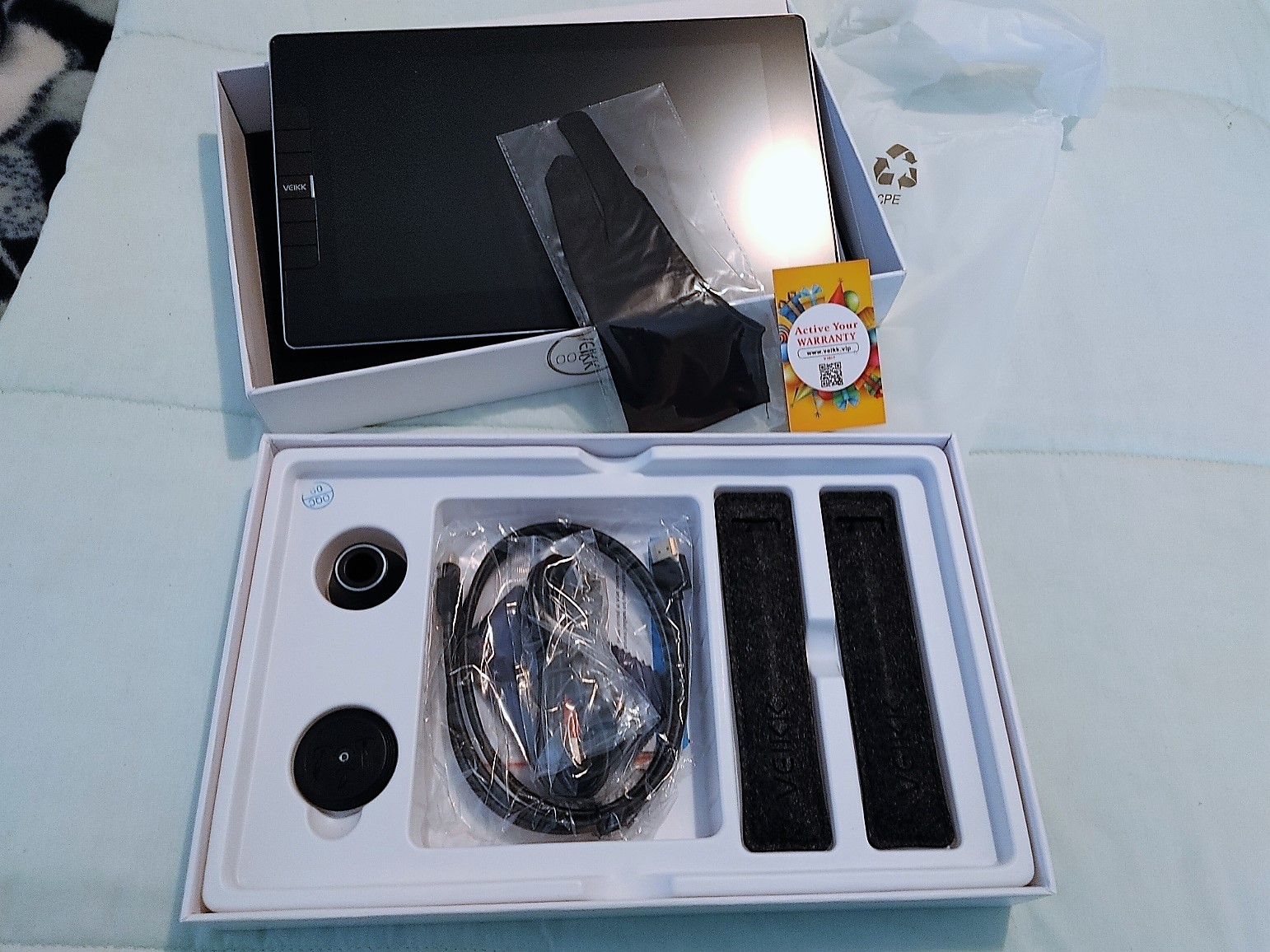
My BRAND NEW Veikk VK 1200 Pen Display Tablet arrived in the mail the other day, a full week earlier than I expected it. Woohoo!

My new Veikk VK1200 Pen Display Tablet


I bought it on Amazon.com Prime day for a really great price...under 200 including shipping (which isn't free to me because only Amazon.ca prime gives me free shipping...but Canada cancelled our Prime day so I had to order from the US site.

Veikk VK1200 Pen Display Tablet
It was well packed and came super fast.  
Veikk VK 1200 Pen Display Tablet

I was a bit worried because when I tried to download the driver, Veikk's website was down, but I was able to message someone at Veikk to let them know and they sent me a message back a few hours later to apologize and tell me their site was up and running again. I downloaded the driver and tested to see if the tablet worked. It did :-). 

First Veikk sketch
I didn't have much time to test it out because my brother came in from out of town, so I just managed this simple little drawing/sketch of a fish jumping. It was really just to test out the program, and also to see how much I remembered learning from the day before. I remembered how to do layers, and how to add color without going out of the lines. I also had some fun with different brushes. I can't wait to try it again.

Having said that, I'll miss my little Wacom.  Unfortunately, I can't use both at the same time because for some reason these tablets hate the drivers of every other tablet, so every time you install one art tablet's driver you first have to uninstall all the others.  My little Wacom is really tiny and only has a 6 by 3.7 inch drawing area, which is really small and causes my hand to cramp up, BUT I love how light and easy it is to use.

The new Veikk has a much bigger drawing area, 11.6 inches, and it also has a color screen that shows my drawing right on the screen so I don't have to look at the computer, which is nice, but it will take some time to get used to.

It had a lot of very good reviews though, so I'm hoping I'll like it.  It's a cool tablet, and I love how affordable it was.

Last year I tried to get a pen tablet, and ended up returning it because it never ever worked, right out of the box. It took me a year to build up the courage to get this new tablet.  I'd love to stick with Wacom but the prices for bigger tablets are crazy high, even for ones without the pen display (the screen that you can see and draw on).  I do like the Veikk so far and can't wait to spend more time with it.

It came with 2 pens, 2 pen cases, lots of extra pen nibs, a pen stand, a little glove, and a microfibre cloth. I'm babbling so I'll stop now, lol, but I really am hoping I'll enjoy using it and learn how to draw better. 

Digital Art

 I'm still learning :-)

I'm having fun with Clip Studio Paint Pro, and have been following the built in tutorials. I'm learning a LOT.  I'm just not retaining everything, so every day I have to relearn it.  Bleah, lol. Aging sucks when it affects memory.

Here are some of my most recent sketches, done on Clip studio, using layers (so far I have a paper layer, a sketch layer, a line art layer, and a color layer). 


Practicing "my" character with Clip Studio Paint Pro

More practice with clip studio. 

As I learn, I'm also learning how to sketch. I'm not an artist by any means but I've always loved drawing and arts and crafts in general.  I know these look like something a little kid could draw, but I really want to keep the characters super simple. 


I need to learn how to draw different facial positions, and different poses. I'm having fun though. 

Bakery Simulator/A first Look

Tuesday, June 29, 2021

Digital Drawing, Parrot Practice

Searching for a Simple Shape for a Parrot


I've been practicing almost every day and still enjoying myself. 


Simple cartoon style

I'm still learning how to use Clip Studio paint, so I'm keeping my drawing very simple.  I tried to learn a function that lets me edit the lines on the vector layer  Supposedly I can select an area and pinch the lines into whatever shape I'd like.  I couldn't figure that out, but I was able to select a portion of the drawing and change the lines color and style. 

 I wish there was a way to watch the tutorials within the program, but it just brings me to another page so I have to keep switching between pages.  I could watch on my phone but then it's too small to see.  Maybe I should watch the tutorials on my Quest; then they'd be huge, and I'd just have to lift the headset to look at the drawing program, lol.  I'm sure I'll figure it out...I just wish I had a better memory.

Stones of Harlath VR/ 3 Oculus Quest 2/ Into the Mines

Sunday, June 27, 2021

My First (VERY Short) Comic Strip

 So this is Day3 of learning digital art on Clip Studio Paint.  

I'm still having a blast. 

First Life with Smokey Comic strip

I learned how to do speech and thought balloons; yay!


I also learned how to put backgrounds on text (the white surrounding the word "crunch") and although it took forever, I learned how to change the text into a raster layer so I could select it with the lasso tool and rotate it .  Happy days, lol.


I just hope I can retain the info.  I'm learning so much, and if I can even retain one thing out of every 3 things I learn, I'll be happy, lol.  


Smokey HAS actually chewed my books before, and she does know how to say "No" and responds to my questions, so this is semi realistic, although to be honest I just added the book because her wing/arms looked weird without holding something.


I had a bit of a hard time with the book but I sketched everything out before doing the line drawing (the black lines).  My hands are still shaky but I discovered the STABILIZATION tool, which really, really helps.


It takes me way longer than I'd like to do these little drawings.  I watch real artists on YouTube and am blown away by how fast they can draw.  It's amazing...like watching magic.  I'm sure I'll get faster with practice, and that I'll get better with practice.  


Digital Art with Clip Studio Paint

 Trying to learn digital art is fun...

...but hard, lol!

 
First try for comic/cartoon of me and Smokey using Clip Studio Paint

I bought a tiny Wacom Intuos Small graphics tablet last year and after trying it out a few times, promptly put it away. It was fun but frustrating.  I often meant to pick it up again, but always put it off. 

Then, for the last few months, I've been really feeling the urge to learn how to draw. I have been living with a talkative African Grey Parrot named Smokey for over 30 years now, and I have lots of funny stories.  I thought it would be cute to make little illustrated drawings, or cartoons, or comics, sharing the stories. 

But I can't draw. This week I decided it was time to learn.  So I watched a bazillion YouTube videos.  I have 2 free art programs that came with my tablet; Corel Paint Studio, and Clip Studio Paint. I also downloaded the free Krita program last year...and also tried every free demo I could find.  Oh, and Sketchbook too.  I think that's why I got overwhelmed.  It's still overwhelming, to be honest, but I found some nice tutorials for Clip Studio Paint, so I've been playing with that.

My first pic, above, was my attempt to turn myself and my parrot into comic or cartoon characters. I'm not sure of the terminology, lol, or what the difference is...except maybe that cartoons are animated and comics are not?  Anyway, I was really happy with my character, although I cheated and put her hands behind her back.  I used simple dots and lines for the features. It worked for Comic Kat, but not so well for Comic Smokey.  She looked weird...probably because I was trying to draw from memory.

BUT, even though the drawing wasn't great, it taught me a lot. There is soooo much to learn.  Layers, for one.  I did a sketch layer, then on a second layer I did the line drawing over top.  I learned how to use the fill tool.  I played around with pens/pencils/brushes in the program. I had fun, and I was happy with the result.


I watched more YouTube videos and tried again the next day (Photo below).

Comic Me and Smokey, try number 2

I was MUCH happier with how Smokey came out in this sketch/drawing (what is it called, lol?). I looked at reference photos first, which I didn't think I'd have to do after living with the same bird for over 30 years, but who knew that my brain simply didn't pay attention to details, lol?  I changed the bird comic's eyes, and gave her arm like wings, making the feathers extend a bit like fingers. I'm happy with the results, but wish my line art wasn't so shaky and wobbly looking. 

 I wasn't as happy with my character, comic Kat.  I think she was cuter on the first try, but I did add simple line details to show her elbow, and gave her 4 rather weird looking fingers.  With painted nails.  

For this picture, I had to remember how to use layers, and the color fill tool, and I had to learn how to use the ruler tool to draw straight lines for the cage bars. It was a bit confusing because I somehow made it look like her ring toy was on the outside of the cage.  I had to add an extra layer to redraw the cage bars over the ring toy, lol.   

I also learned how to use the selection tool to crop photos, copy any and paste parts of the photos (I only drew Smokey's eye once, and then copied and pasted it and moved it into place.  I used the lasdo tool to make my character bigger, and to move her down so she was shorter. 

I still need to learn how to draw backgrounds and add speech bubbles, and I need a LOT of practice drawing so that my characters look better, but I'm having fun, and I have a goal. 

I honestly don't know why I waited so long to get back into this. I think I was just so stressed out by the pandemic that I didn't have room to add another stressful thing, even a good stress, like learning something new.  Now that I've had my first vaccine shot (and my parents have had both of theirs and are fully vaccinated) I'm feeling a little less anxious. 

Well, time to get to work, learning how to make speech bubbles, lol.  Take care :-). 


Animal Shelter/ Steam Next Fest Demo Week

Friday, June 18, 2021